How a Kanban system uses cards and signals to cap work in progress, with a worked shop floor example and a comparison with push production and one-piece flow.
TL;DR: A Kanban system is a pull method where a signal, usually a card or an empty bin, authorizes a process to make or move parts only after the next process has used them. It caps work in progress and ties production to actual consumption instead of a forecast.
Key Takeaways
- Consumption drives production: Downstream use triggers upstream production, so each cell makes only what has been consumed.
- Cards are the WIP limit: The number of cards in a loop is the WIP limit. Once the limit is ignored, the system stops controlling flow.
- Best for repeat items: Kanban suits repeat items with fairly steady demand. Irregular, low-volume parts usually need another method.
- Measured data beats estimates: Card counts depend on real demand and real replenishment time, so measured data gives better loops than estimates.
How a Kanban System Works
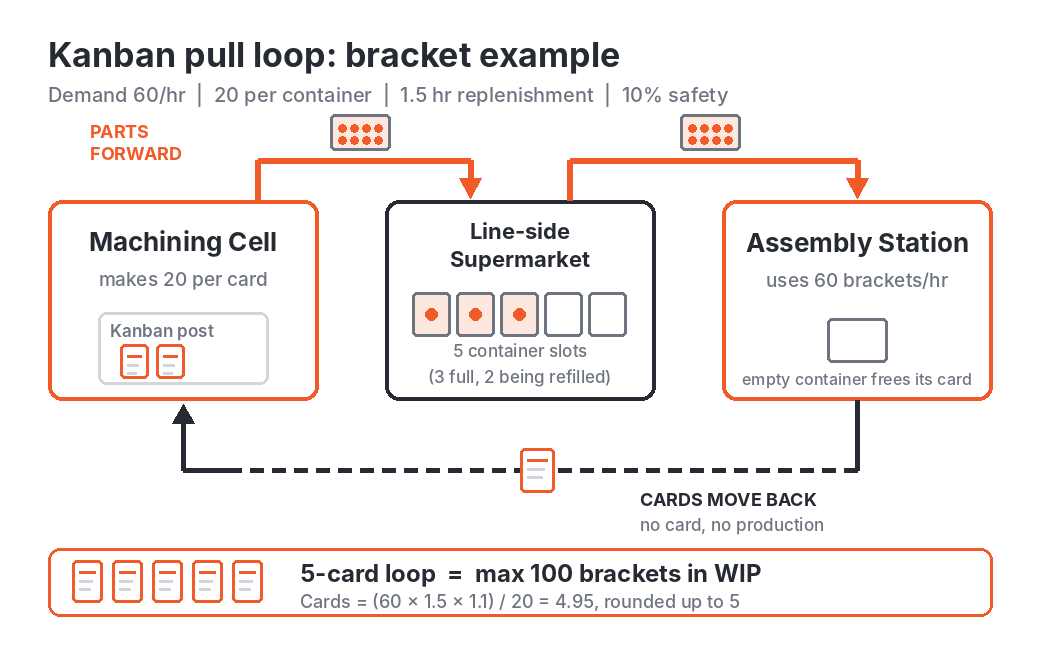
A pull system manufacturing setup builds only what the next process has used. The signal can be a card, an empty bin, an empty painted square on the floor or an electronic message. A production kanban tells a cell what to make. A withdrawal kanban authorizes moving parts from a supermarket to the next process. The rule is simple: no card, no production.
The number of cards in a loop sets the maximum WIP and is usually sized with this formula:
Cards = (demand per hour × replenishment lead time in hours × (1 + safety factor)) / container quantity
Both inputs in this formula, demand rate and replenishment time, come straight from the shop floor. Tracking actual output per hour with production monitoring software keeps those numbers grounded in what the cells really produce.
Worked Example: A Bracket Loop in a Machining Cell
Assembly uses 60 brackets an hour. Each container holds 20. From the moment a card is released to the moment a full container returns, replenishment takes about 1.5 hours, covering machining, inspection and transport. The safety factor is 10%.
Cards = (60 × 1.5 × 1.1) / 20 = 4.95
Rounded up = 5 cards
The loop then runs like this:
- Assembly empties a container and sends its card to the kanban post at the machining cell.
- The cell makes 20 brackets for the card, working in the order cards arrive.
- The full container travels back with its card to the line-side supermarket.
- Assembly pulls the container and the loop repeats.
Five cards cap the loop at 100 brackets. When every container is full there are no cards at the post, so the cell stops or switches to another job instead of overproducing.
Push vs Pull Manufacturing: Kanban, Push and One-Piece Flow
| Aspect | Kanban (Pull) | Push Production | One-Piece Flow |
|---|---|---|---|
| Work is triggered by | Downstream use | Schedule or forecast | Next station being ready |
| WIP level | Capped by card count | Grows when stations run ahead | About one part between steps |
| Best fit | Repeat items, steady demand | Make-to-order, irregular demand | Short routings, balanced steps |
| Main risk | Cards added or ignored | Overproduction and queues | Little buffer for stoppages |
Kanban Board in Manufacturing: Physical and Digital
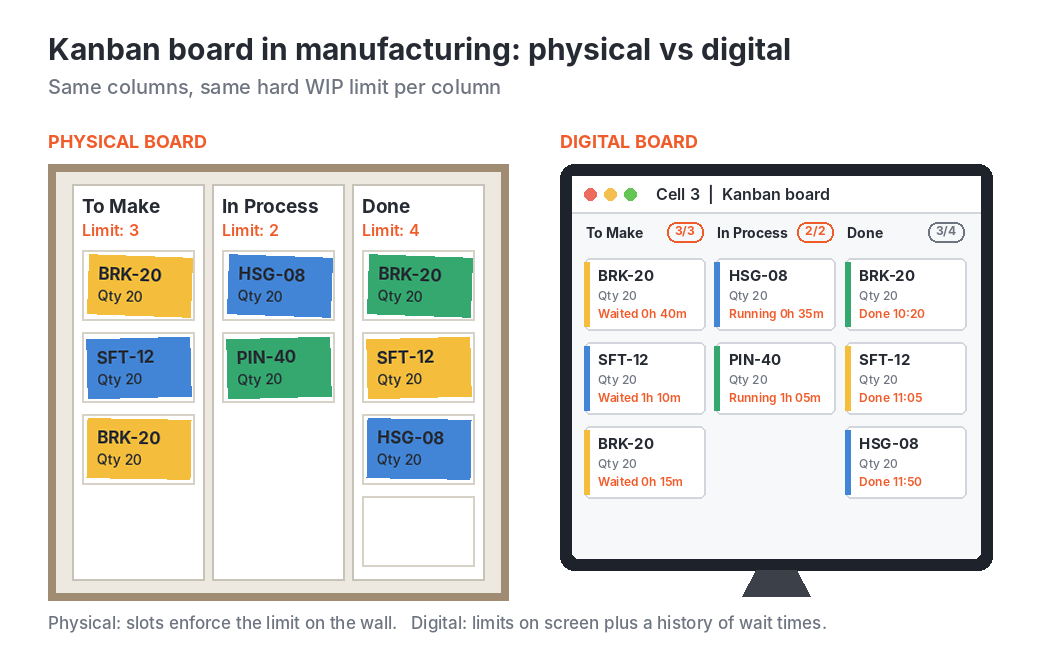
A Kanban board in manufacturing works the same way on a smaller scale. A physical board uses slots or columns such as to make, in process and done, with a hard limit per column. A digital board applies the same limits on a screen and keeps a history of how long each job waited.
“Kanban stops working the day someone adds one more card to get through a busy week. The limit is the whole point. Once it moves, you have a queue with a nicer name.”
[Name], [Designation], [Company]
Where Live Production Data Helps
A pull loop is only as good as the numbers behind it. Demand rate and replenishment time are usually guessed when cards are first sized, and the guesses go stale. When machines report cycle time and output automatically through machine monitoring software, those inputs come from the floor and the card count can be checked against reality.
sfHawk gives a supporting view for this. Seeing output, WIP and machine status for each cell shows when a loop is starved, when a cell is still running while its cards say stop, and which machine keeps emptying a loop. Linking each container to the parts and machines behind it through manufacturing traceability software makes WIP visible at every stage. See how this works in a real plant in our smarter, automated traceability and management of WIP use case.
Frequently Asked Questions
What is the difference between Kanban and Andon?
Kanban signals demand for parts. Andon signals a problem, such as a stopped machine or a quality issue that needs help. Many plants use both.
Kanban vs JIT: are they the same?
No. Just-in-time is the goal of making only what is needed, when it is needed. Kanban is one of the tools used to run a just-in-time system.
Does Kanban work in high-mix production?
It works for runners, the items that repeat often enough to hold stock. Common parts get kanban loops and rare or custom parts are made to order. If most parts are one-offs, other controls such as CONWIP, which caps total WIP in a cell, usually fit better.
Related Reading
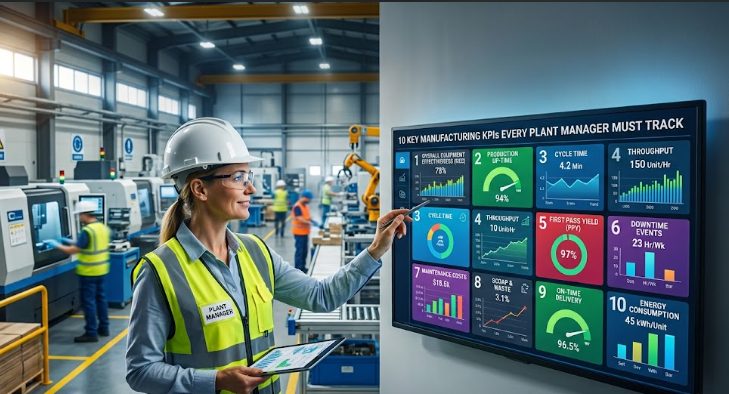
Pull loops work best when output and WIP are visible as they happen. See how production monitoring software tracks output by cell and shift, and how machine monitoring software and OEE monitoring show which machines are holding a loop back. For parts moving between processes, explore manufacturing traceability software and batch and lot traceability. For the wider picture, read about smart factory and Industry 4.0 monitoring, the setups and production scheduling use case and the 10 manufacturing KPIs every plant manager should track.
Get Started Today! Book a call with sfHawk | Email: inquiry@sfhawk.com | Phone: +91 91120 98351 | Website: www.sfhawk.com